The State Of AI In Design Systems 2026
A field study of 20 open-source design systems and 150+ techniques teams use to keep AI from drifting off-system, plus a practical pipeline for turning Figma components into production-ready code.
Every product design team struggles with AI drifting. You might have a truly sophisticated, well-documented design system, but as you apply AI to generate design or UI components into it, it's only a matter of time until things start falling through the cracks.
The output might look passable at first, but it fails miserably when it comes to fine details. And it's these details which often make or break UX. So what do product teams do to reduce drifting with AI in their design systems? Well, let's take a look.

The State Of AI In Design Systems 2026, an interactive study of 20 open-source design systems, examining 150+ techniques and how each makes itself AI-ready. By Kaelig Deloumeau-Prigent.
AI Lessons Learned By Design System Teams #
A few weeks ago, Kaelig Deloumeau-Prigent released his comprehensive field study of 20 public design systems, exploring 150+ techniques used by teams — and examining how teams use them to reduce AI drifting.
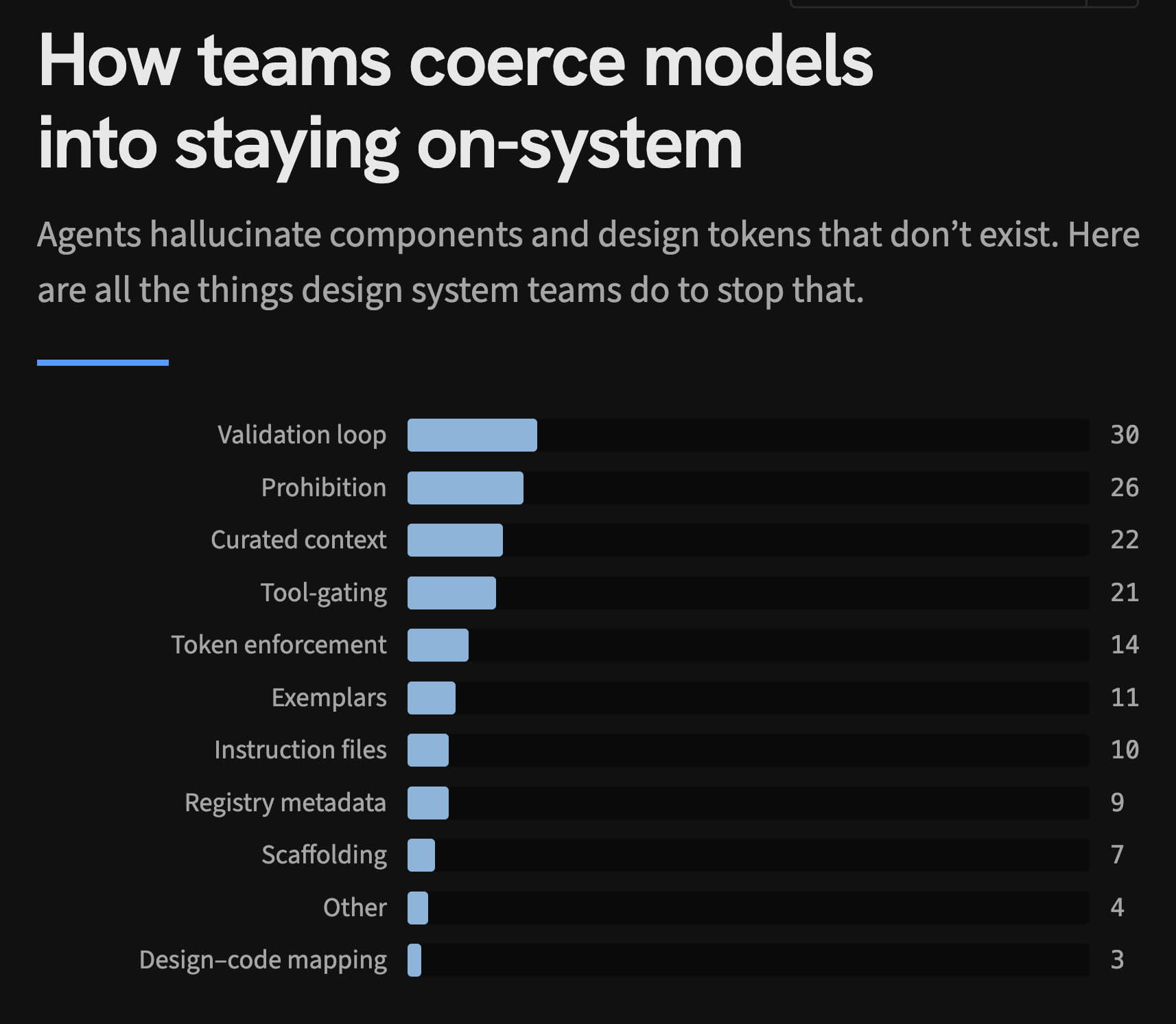
By default, AI hallucinates components and design tokens that don't exist. Product teams have to work hard to coerce AI models into staying on-system. Jump to the study.
Not every design system needs to be AI-ready, but most enterprise systems are. According to the study, large design system teams now ship a machine-readable, or "AI-ready" version of their design system (typically an llms.txt file).
The differences are in how they slice, gate and maintain context. Some design systems come with evals, token, time and turn counts. Some run a nightly benchmark vs. baseline to minimize regressions. AI artifacts are now measured and versioned and tested — often before even being displayed.

Anthropic breaks down the mechanics of designing evals for agentic systems, from defining success criteria to catching silent failures.

Anthropic breaks down the mechanics of designing evals for agentic systems, from defining success criteria to catching silent failures.
To keep the design system up-to-date, context files are automatically compiled and regenerated on every release. Validation loops make agents run linters and audits until they pass. Many systems focus on curated and isolated walled gardens to reduce drifting. And to be most effective, negative examples and failures are explicitly mentioned in docs.
In terms of architecture, it's typically a SKILL.md router with reference files requested only when needed to reduce noise and context pollution. These top-level agent files are usually small, with retrieval used over persisting context.
Most notably, most design systems include deterministic checks — not LLM — in the generation path, which also block a merge. In fact, none of the DS setups rely on generation alone and use deterministic checks to make AI fix what fails before preview even appears.

The AI-Ready Design System Index scores every design system against 5 signals to assess how well AI tools can actually use it. By Kiryl Zhukouski.
Another interesting research on the topic is the AI-Ready Design System Index by Kiryl Zhukouski, in which every design system is scored against 5 signals to see if AI tools can use it meaningfully. First-party MCP servers are still rare, and llms.txt is the most common choice.
Perfect AI Pipeline: From Figma To Production-Ready Code #
A few weeks ago, Kaelig also published a very practical guide on how to build production-ready UI components with AI agents. Essentially, it's a pipeline with 8 specialized AI agents that turns a Figma component into a production-ready React component.
Each AI agent has a specific job — extracting design tokens, writing markup, checking accessibility, writing tests — and they hand off work to each other through component contracts.

The workflow turns Figma components into production-ready React components. Without drifting — with 8 AI agents in place. Jump to the case study.
The workflow is broken into 8 standalone AI agents:
- Understand. Before writing any code, we guide AI to understand what it has to build. So we use a Design Analyst to study the Figma files and produce a spec with variants, states and design tokens.
- Next, a Library Researcher audits every dependency in the project and creates component rules.
- Then, a Component Architect sits between research and code and designs the component API with handoff notes.
- Build. Eventually, Code Writer takes all artifacts and generates the front-end component. It has guardrails to follow — component rules, strict rules about tokens.
- In the loop sits Accessibility Auditor that takes a critical look at accessibility, and it must pass before continuing to the next step.
- Finally, Story Author produces Storybook stories, covering every variant, state and edge case.
- Verify. Next, we check the output against the original design. Visual Reviewer screenshots the rendered Storybook stories and assesses them against the Figma design.
- Finally, Quality Gate runs technical checks to auto-fix what it can and report what it can't. If the same error persists after one retry, it stops rather than looping.

The whole AI agent architecture in an overview. Whenever the system encounters conflicting data or drops below a quality threshold, it stops and asks for human input.
Pause-And-Ask Gates #
According to Kaelig, not all failures are the same. Most AI systems treat every mistake as a prompt engineering problem. The research showed that only about half the failures were prompt-fixable. Other issues had to do with human judgement and infrastructure issues.
A noticeable part of the workflow is Pause-And-Ask Gates. Whenever there is conflicting data, or the quality drops below the threshold, or a manual human test is required, the system pauses and asks for the user's clarification or action. The point isn't to automate away human judgement, but to proactively clarify with a human to prevent silent assumptions.
If you are looking for more details, Kaelig goes into all the fine details in his extensive case study, along with all steps, failures and considerations that resulted in the pipeline he established to achieve production-ready results.

To get better results, AI needs better guidance that minimizes assumptions and reduces ambiguity. Guide by Hardik Pandya.
And if you are looking for an alternative approach by Atlassian, Hardik Pandya has put together a practical guide on how to make your design system AI-ready, and we wrote a bit about that as well.
Wrapping Up #
Best AI experience comes from guiding and helping AI, rather than automating tasks away. The workflow above doesn't replace design or engineering. It eliminates the mechanical parts of their work, but also creates time and space for checking in and asking for human decisions — to make the right choice instead of making a random one.

Bonus: 39 principles for designing human–AI interfaces from public enterprise design systems. By Taras Bakusevych.
It's also remarkable just how sophisticated the design system AI tooling has become. It's worth noting though that not every design system will require this level of architecture and maintenance. Most of the time, dedicated teams will be working on maintaining such systems and ensuring that AI drifting for prototyped and AI-generated flows actually works.
But if you are looking at an enterprise-level design system with the ambition to produce production-ready quality work with AI, that might be an approach worth looking into.
Useful Resources #
- State of AI in Design Systems, by Kaelig Deloumeau-Prigent
- Building Design System Components With Agent Teams, by Kaelig Deloumeau-Prigent
- How To Make Your Design System AI-Ready, by Hardik Pandya
- How To Reduce AI Drifting In Design, by Vitaly Friedman
- AI-Ready Design System Index, by Kiryl Zhukouski
- AI-Ready Design System Roadmap, by Ilya Greben
- 39 Principles for Designing Human–AI Interaction, by Taras Bakusevych